Thursday, 10 December 2015

Follow Me Car

I do not have free camera mod and wanted to take some screenshots while exploring round some of my airports. It is pretty hard to find a good road vehicle for FSX and I could not find any payware. I wanted something that was simple to install and fits in with the airport environment.

I found this yellow "follow me" car, that appears to be a VW Transporter. Very easy to install, just unzip and copy the folder to the "SimObjects/Airplanes" folder. I took it out for a run at Kathmandu airport and managed to get to 100 Knots on the main runway, but it has very slow acceleration.

It does not turn very well either, but looks the part and was useful for driving around taking some screenshots of the airport details.

The car is available for download here.

Here is the car driving around Kathmandu airport:

Follow Me car, Kathmandu
Follow Me at Kathmandu Tribhuvan VNKT airport

It does not seem to have a panel for interior view mode, so I drove it 3rd person. Not the best car maybe, but it is quite acceptable. No reverse gear!

A better scenery for driving around is Gibraltar X, where I stopped to fill up with fuel:

Follow Me car, Gibraltar on FSX
Stopping for fuel on Gibraltar, they drive on the right over here

Wednesday, 9 December 2015

Free German airfield scenery, Wasserkuppe by Aerosoft

Aerosoft sell a very good range of German Airfields in sets available for download from their website, as an example, the excellent German Airfields 1, Island Hopping. This set includes 15 detailed airfields in and around the Frisian Island chain in the North-East of Germany.

Taxiing to the take-off at Wasserkuppe
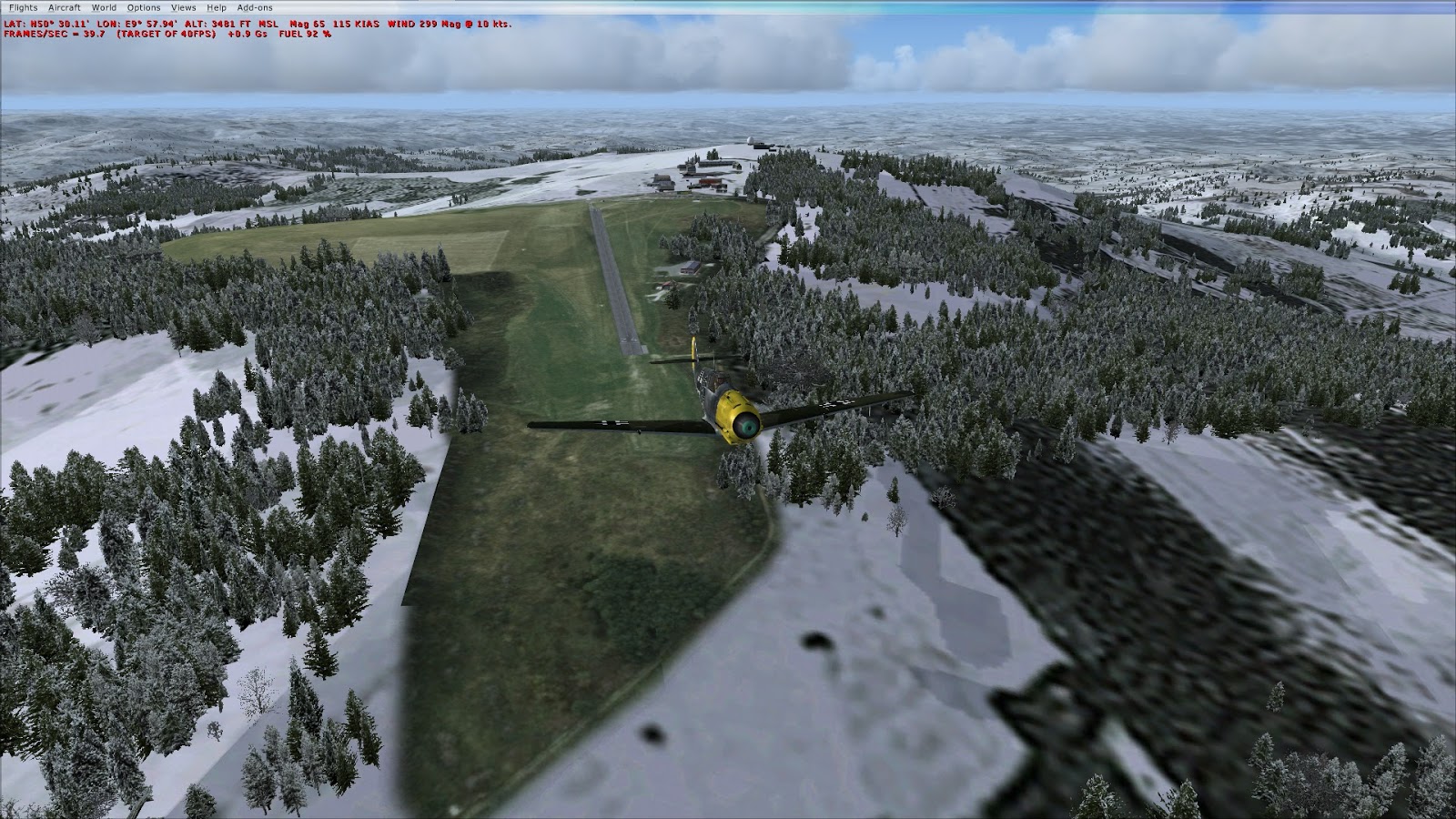
They also provide a free example of their work, for the Wasserkuppe airfield on the highest peak of the  Rhön Mountains. The grass strip airfield is used by light aircraft and gliders. The immediate area of the airfield is used for skiing.

Buildings around the initial parking location at Wasserkuppe
This custom scenery includes accurate and well modelled buildings on the summit, including the Radar Dome. Select the scenery in Free Flight by choosing Wasserkuppe as the city and then "Wasserkuppe NEU" as the airfield. The original Wasserkuppe will park the aircraft below the surface of the runway! The ID for this field is EDS8, do not use the ICAO code of EDER, as it has the location anomaly.

Takeoff in winter in Bf109, ski-lift is not visible

Monday, 7 December 2015

VFR-1 Thame/Aylesbury Airfield EGTA, RAF Haddenham

Today I was taking a look at a couple of airfields near the Chilterns in England. They are part of UK2000 VFR Airfields, Volume 1. Loading the flight file "VFR-1 Thame" takes us to a Cessna 172 parked at the airfield. From there it is a short flight east to RAF Halton, which is right next to a static airship in the sky.

Thame airfield on FSX
Parked at Thame

The airfield is no longer operational, but was RAF Haddenham, named after the Buckinghamshire village it is next to. RAF Halton (EGWN), is another small grass strip. Both airfield have some static gliders and a few hangars, that closely resemble the real-life photos.

Flyover of Thame airfield on FSX
Fly over Thame airfield
Haddenham was first used as a glider training facility during the Second World War and after the war was home to Airtech, a company that serviced and customised aircraft from all over the world. In recent years the small airstrip is home to the Upward Bound Trust, a charity that provides glider training for young people.


Finals at RAF Halton on FSX
Approaching RAF Halton

Graphics Settings Nvidia Geforce GTX 760

My graphics card is a Palit Geforce GTX 760, that I purchased to run GTA V and Battlefield 4, but it also works very well with Fight Simulator. I did have an AMD card, but I prefer this one. My CPU is a bit out of date now and my motherboard is only PCIE2, but it still can manage quite high settings to give a smooth frame rate of about 40fps at 1920x1080 (Native for my 24 Inch Monitor).

So here are my current settings:

Settings Summary


Graphics Custom Settings


Aircraft, Ultra High


Scenery Custom Settings


Weather Custom Settings (REX Soft clouds)

Traffic Custom Settings

I don't run with any traffic addons, but use REX Softclouds for the weather. I have a lot of addon scenery and airports, so I tune down the settings to give me a smooth frame rate.

This is the Steam Edition running on AMD Phenom II 965 (3.4GHz Quadcore) with 8GB RAM. I use a Speedlink Blackwidow joystick and my framerate improved greatly by uninstalling the custom Blackwidow drivers and using the Windows 7 built in drivers for USB Game Controllers.

Wednesday, 23 September 2015

KAJO, Corona Municipal Airport, Corona, California

This is part of the North American freeware pack 1 by ORBX. I took a short flight from KAJO to Los Alamitos Army Airfield, which is just east of Long Beach airport. It's an easy VFR flight, following route 91and the Santa Ana River, flying through the gap in Chino Hills State Park and Sierra Peak. Corona Airport is a small municipal airport with a single east/west runway (25 and 7). It is surrounded by forest to the north and west, Lake Mathews to the South-East and some hills just west. The airport scenery has a lot of hangars and static light aircraft.

Flying out after a good breakfast at Corona Airpot Cafe
Some nice animated ground crew near the refuelling station
I am using the freeware with with Aerosoft's Los Angeles X scenery. A good landmark en-route is the Angel Stadium of Anaheim after the Santa Ana river turns SSW. From there I follow the grid road system directly west to Los Alamitos, that is visible just before the ocean at Long Beach. Runway 22L is the main runway. There are some static Black Hawk helicopters parked pretty much where they are visible on the Google Satellite view.

Route through the pass following 91
 
On final approach to Los Alamitos, Long Beach in the background
Quite a nice little airport in an area, worth exploring. Does not hit the frame rate too bad either. Lots of interesting static touches around the airport including static aircraft, mobile homes and the cafe.

Static aircraft and mobile home behind the runway


Thursday, 17 September 2015

FSX Steam Edition, DLC Aircraft files location

I installed the Just Flight Bf109e yesterday, but wanted to find the manual as it's not obvious where it is put. Steam just does it's work in the background and no indication of the folders it uses. Especially confusing for me as I have a mix of FSX Gold Edition and FSX Steam Edition folders and alo a lot of addon content on a separate SSD, so more than one Steam folder.

After quite a bit of searching using the painfully slow Windows 7 file finder in Explorer (searched for bf109), it turns out the DLC content for the Messerschmitt is in D:\Steam\steamapps\common\FSX\DLC\379232

What a really obvious place for it ! That folder has 4 subfolders and some DRM files. The folders are Effects, JustFlight (contains the manual), SimObjects and Sound.

So the full manual path for me is (it's on my SSD), "D:\Steam\steamapps\common\FSX\DLC\379232\JustFlight\BattleOfBritain_Me109\Me 109 manual Steam.pdf"

I created a shortcut for it and placed on my Desktop !

Wednesday, 16 September 2015

Just Flight, Messerschmitt Bf 109 (Me 109), Steam Install

I was looking at the Battle of Britain Me 109 on Just Flight Website and it was on offer, but I decided to go for the one on Steam, which is the same one, but Steam installs it, a slightly increased price of 19.99 Euro. I paid for the convenience and it was my first Steam DLC purchase, so I was interested to see how it went. Well it installed automatically and was a very small download, did not ask me for a disk location. I found it on Free Flight by filter for manufacturer of Just Flight.

Bf 109 parked at Wangerooge
So here it is, in all it's glory, a Bf 109 E4, I chose one of the 17 liveries that come with it and landed at EDWG (Wangerooge), part of German Airfields volume 1, which I strongly recommend. There is a very good review at Mutley's Hangar, German Airfields 1 - Island Hopping from Aerosoft. I use this pack with my favourite Britten-Norman Islander, and there is indeed a static one parked up, just out of shot to the left.

There is a conflict with FTX Global airports here, two runways overlay each other, so uncheck FTX_AA_GLOBAL_AIRPORTS in the Scenery Library. Below shows takeoff from EDWI Wilhelmshaven.


One thing I am not happy with, but maybe it's because I don't understand it, I was pressing PrtSc button to take numerous screenshots, but they did not appear in the usual place "Pictures/Flight Simulator X Files", maybe that's because I am running the Steam version now. I only found the one above and it was in a bizarre place on my disk and nothing in the Cloud?! The normal key in FSX is V for screenshot (they are saved in C:\Users\{User}\Pictures\Flight Simulator X Files